
Introduction
Effective change management is crucial for controlling cost, quality, and time in product development. Change Management in 3DEXPERIENCE enables a closed-loop, collaborative change process where nothing gets modified, approved, or released without a clear record of who asked for it, who reviewed it, and who implemented it.
This blog explains how Change Managers can efficiently handle changes in a SOLIDWORKS + 3DEXPERIENCE environment — from the moment someone requests a change to the moment it is fully implemented across every affected part, document, and team.
What Is Change Management in 3DEXPERIENCE?
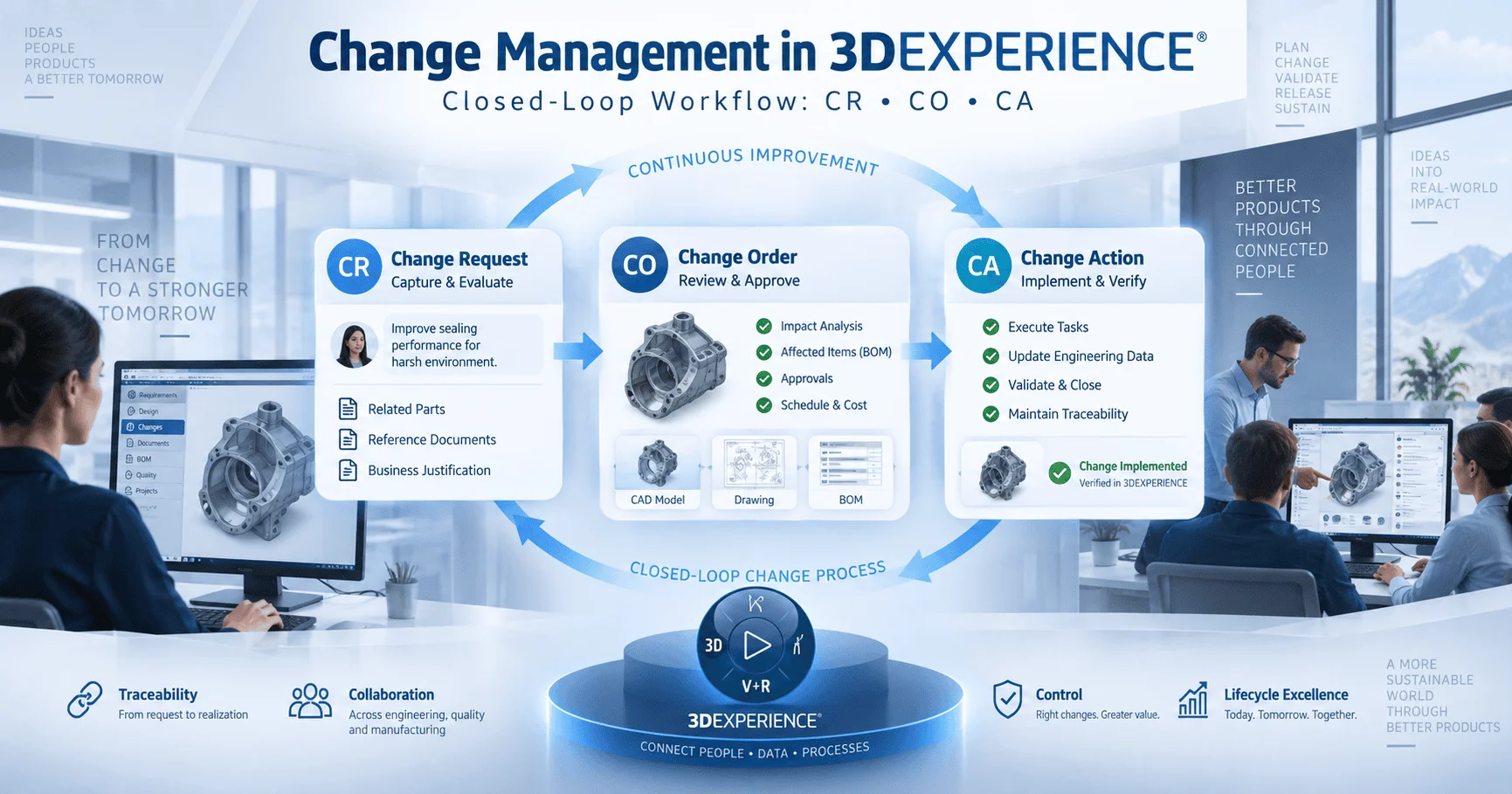
Change Management in 3DEXPERIENCE is the structured process by which product changes are proposed, evaluated, approved, and executed inside the 3DEXPERIENCE platform. Instead of emailing a spreadsheet around or tracking revisions in someone’s inbox, every change moves through a defined, auditable workflow with three connected objects: the Change Request, the Change Order, and the Change Action.
Because the process is “closed-loop,” nothing falls through the cracks. A request cannot silently become a design change without approval, and an approved change cannot quietly go unimplemented. Every step is visible, timestamped, and owned by a specific person.
Why Closed-Loop Change Management Matters
A closed-loop process is what separates disciplined engineering organizations from ones that constantly fight fires. Here is why it matters:
- Prevents uncontrolled changes and costly errors. Without a formal gate, someone could modify a released part without anyone else knowing, leading to mismatched drawings, wrong parts on the shop floor, or scrapped inventory.
- Ensures full traceability from proposal to implementation. Every change carries a complete history — who requested it, why, who approved it, and what was actually done — which is essential for audits and warranty claims.
- Improves cross-functional collaboration. Design, manufacturing, quality, purchasing, and service teams all see the same change data at the same time, instead of finding out about a change after the fact.
- Reduces time and cost impact of changes. Structured impact analysis catches expensive problems early, before they reach the factory floor, rather than after parts have already been built.
This is precisely why organizations adopt Change Management in 3DEXPERIENCE rather than relying on email threads, shared drives, or standalone spreadsheets to manage engineering changes.
End-to-End Change Process in 3DEXPERIENCE (CR, CO, CA)
The heart of Change Management in 3DEXPERIENCE is a three-stage process. Each stage has its own object, owner, and purpose, and a change cannot skip ahead to the next stage until the current one is complete.
1. Change Request (CR) — Identify and Propose the Change
The process starts when someone — an engineer, a quality inspector, a customer complaint, or a manufacturing issue — identifies a problem or improvement opportunity. They log a Change Request describing what needs to change and why. At this stage, nothing has been approved yet; the CR simply captures the idea and routes it to the right people for review.
2. Change Order (CO) — Evaluate Impact and Approve the Change
Once a CR is submitted, it becomes a Change Order for evaluation. This is where the real analysis happens: which parts, drawings, BOMs, and documents are affected? What will it cost? How long will it take? Who needs to sign off? The Change Order carries the impact analysis and the formal approval decision — approved, rejected, or sent back for more information.
3. Change Action (CA) — Execute the Approved Change Across Impacted Domains
Once a Change Order is approved, one or more Change Actions are created to carry out the actual work — updating a CAD model, revising a drawing, modifying a BOM, or updating a specification document. Each Change Action is assigned to a specific owner and tracked until it is complete, at which point the change is formally closed out.
Key Responsibilities of a Change Manager
The Change Manager is the person who keeps Change Management in 3DEXPERIENCE moving smoothly from one stage to the next. Their core responsibilities include:
- Creating and routing Change Requests to the right reviewers so nothing sits idle waiting for the wrong person to notice it.
- Performing impact analysis across design, manufacturing, purchasing, and other affected areas before any change is approved.
- Managing approval workflows and notifications, making sure the right stakeholders are looped in at the right stage and reminded when action is needed.
- Ensuring proper implementation and closure of changes, confirming that every Change Action assigned under a Change Order is actually completed, not left open indefinitely.
- Maintaining a complete audit trail and traceability, so that months or years later, anyone can see exactly why a part looks the way it does today.
Handled well, Change Management in 3DEXPERIENCE turns the Change Manager from a paperwork gatekeeper into a genuine driver of engineering discipline and speed.
Best Practices for Change Managers
Change Managers who get the most value out of the platform tend to follow a few consistent habits:
- Always perform thorough impact analysis before approval. A rushed approval that misses an affected part or document almost always costs more time later than a careful review does upfront.
- Use automated workflows and approval matrices so approvals route automatically based on part type, cost impact, or department, instead of relying on someone remembering to forward an email.
- Link changes directly with Product Release processes, so that once a Change Action is complete, the affected parts move cleanly back into the standard release lifecycle rather than existing in limbo.
- Regularly monitor change cycle time using dashboards, watching for bottlenecks — a CR that sits unreviewed for two weeks, or a CO stuck waiting on one approver — and addressing them before they become chronic.
These habits are what make Change Management in 3DEXPERIENCE genuinely closed-loop in practice, not just on paper.
Benefits of Change Management in 3DEXPERIENCE
Organizations that implement Change Management in 3DEXPERIENCE well typically see:
- Faster change resolution — changes move through defined stages instead of stalling in inboxes.
- Reduced risk of errors — impact analysis catches problems before parts are built, not after.
- Better compliance and audit readiness — every change has a documented trail from request to closure.
- Improved team alignment — design, manufacturing, quality, and purchasing all work from the same up-to-date change data.
Frequently Asked Questions
What is the difference between a Change Request, a Change Order, and a Change Action?
A Change Request captures and proposes an idea for a change. A Change Order evaluates the impact of that request and formally approves or rejects it. A Change Action carries out the actual approved work, such as updating a drawing or a BOM.
Who is responsible for Change Management in 3DEXPERIENCE?
The Change Manager owns the overall process — routing requests, coordinating impact analysis, managing approvals, and confirming changes are fully implemented and closed.
Why is closed-loop change management important for SOLIDWORKS users?
When SOLIDWORKS is connected to 3DEXPERIENCE, every design change is tied back to a Change Request and Change Order, so CAD updates, BOMs, and documentation always stay in sync instead of drifting apart over time.
Conclusion
The Change Manager role in 3DEXPERIENCE brings discipline, speed, and visibility to the change process. Organizations that implement Change Management in 3DEXPERIENCE effectively see significant improvements in product development efficiency — fewer errors, faster approvals, and a complete audit trail from the first proposed idea to the final released part. If you need more assistance in this, than visit to ENOVIA
By Raghav Vaid | Ideas Design Solutions Pvt. Ltd. (IDSPL)